
To figure out how many days between two dates, subtract the earlier date from the later one. For example, September 1 to September 15, 2026 is 14 days. If you want both endpoints counted, turn on “include end date”; if you need to skip weekends, switch to business days.
How Many Days Between Two Dates? The Direct Answer
The basic definition fits in one line: total days = end date − start date. Every date calculator, spreadsheet function, and programming library uses the same math on the two values you enter as start and end dates.
Here’s a simple example you can check by hand: September 1 to September 15, 2026 returns 14 days, because the usual elapsed-day method counts the start date but stops before the end date (calculatorsconversion). Count the same range inclusively, and you get 15.
One set of inputs often returns several numbers, and each number answers a different question. A date difference calculator usually shows total days, total weeks, a years-months-days breakdown, and a business-day count side by side. The Texas Instruments-style breakdown used by ROBERIN makes this clear: 2024-01-15 to 2024-07-16 returns 183 days, 6 months 1 day, and 26 weeks 1 day — three ways to describe the same span.
Two settings decide which number you should trust. The include end date toggle controls whether the final calendar day counts. The business days toggle controls whether Saturdays, Sundays, and sometimes holidays are removed. Set both before you read the result, not after.
All of this works on calendar dates in the Gregorian calendar. A day count measures whole calendar days, not clock time, so a 23-hour or 25-hour daylight-saving day does not change the answer (calculatorsconversion).
The one-line formula: end date − start date
Written out, the formula is elapsed days = end-date serial − start-date serial. The “include end date” option just adds one calendar day to the absolute duration. The business-day result counts Monday through Friday only.
What each result field means (total days, weeks, months, business days)
Total days is the raw count, and it’s the number most people need. Total weeks divides that by seven and keeps the remainder. The years-months-weeks-days breakdown is a calendar-style description, not a measurement — useful for ages and anniversaries, less useful for arithmetic. Business days removes weekends so the result matches a real work schedule.
How to Count Days Between Two Dates in 3 Steps
Any date difference calculator comes down to three inputs and one reading. Order matters here, because choosing the counting mode after you’ve already read a number is how most off-by-one confusion starts.
- Enter the start date. Type it into the first field, or use the calendar picker. Watch the format: most US tools expect MM/DD/YYYY, while much of the world reads DD/MM/YYYY. A value like 03/04 is genuinely ambiguous.
- Enter the end date. The end date can be years or decades after the start date. One calculation handles the full span whether it points into the past or the future.
- Choose the counting mode, then read the result. Decide between calendar days and business days, and decide whether the end date counts. The number only means something after those two switches are set.
- Pick the output field that matches your question. Use total days for a duration, the years-months-days breakdown for a lifespan, and business days for a deadline.
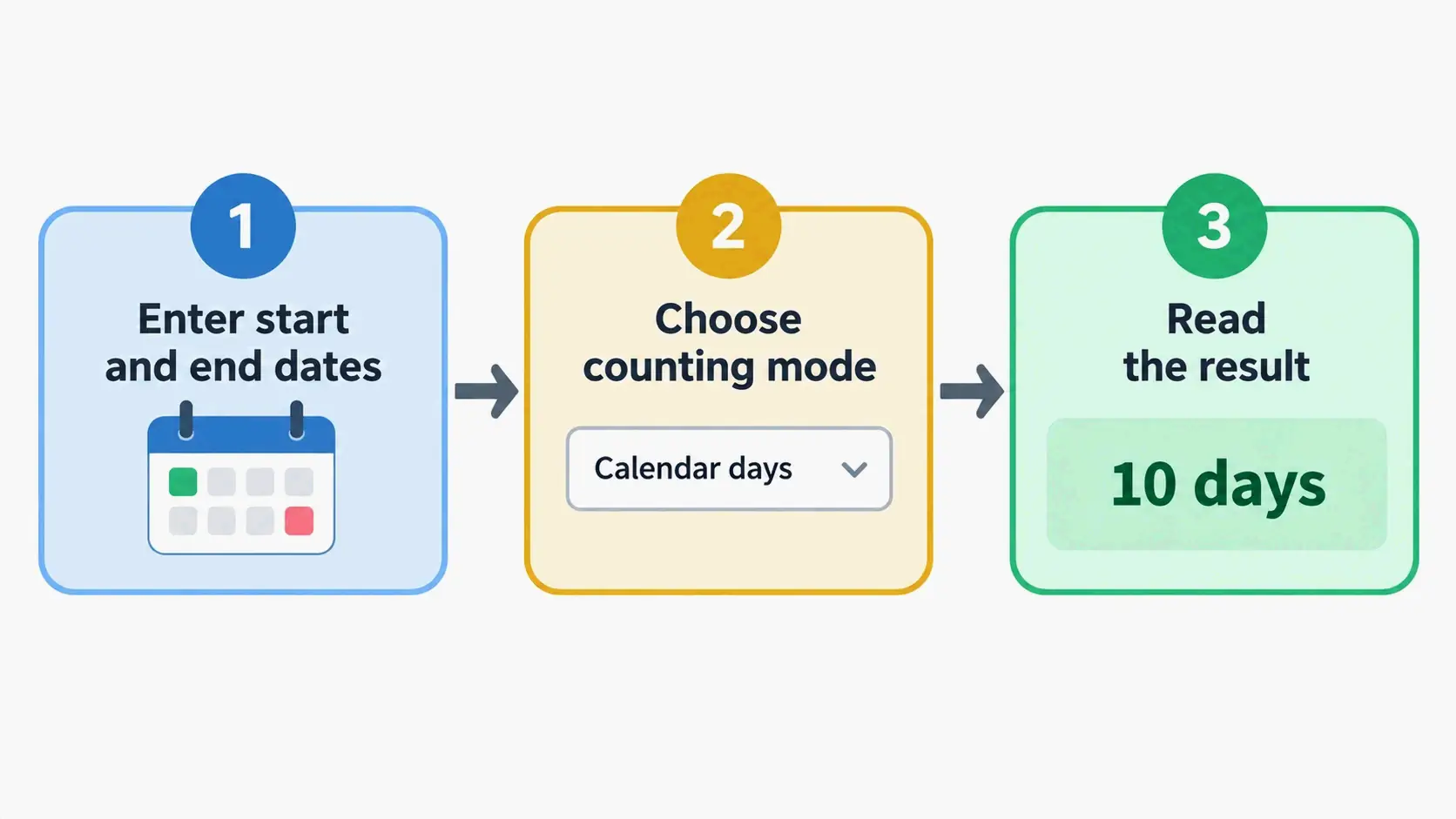
The same dates produce different numbers under different modes, which is the whole point. Take 2024-01-15 to 2024-07-16: ROBERIN returns 183 total days alongside 6 months 1 day and 26 weeks 1 day. Turning on weekend skipping would lower the count further. The dates didn’t change — only the rule did.
Step 1–2: Enter the start date and end date
Both fields accept any calendar date, and the result updates as soon as both are valid. You don’t need to split a long interval into pieces: a span that runs from one year into another is calculated in one pass, with month lengths and leap days handled internally.
Step 3: Choose calendar days, business days, or include end date
Treat the mode selection as part of the question, not an afterthought. “How many days of leave did I use?” and “how many nights was I away?” describe the same trip but need different settings. Lock the mode first, and you avoid the common surprise of accepting a number and later finding out it excluded weekends.
Why the Math Is Exact: Gregorian Calendar Rules and Date Serial Numbers
Date subtraction is reliable because of an internal conversion almost no calculator shows you. Once you understand it, you can see why results are exact whole numbers rather than approximations.
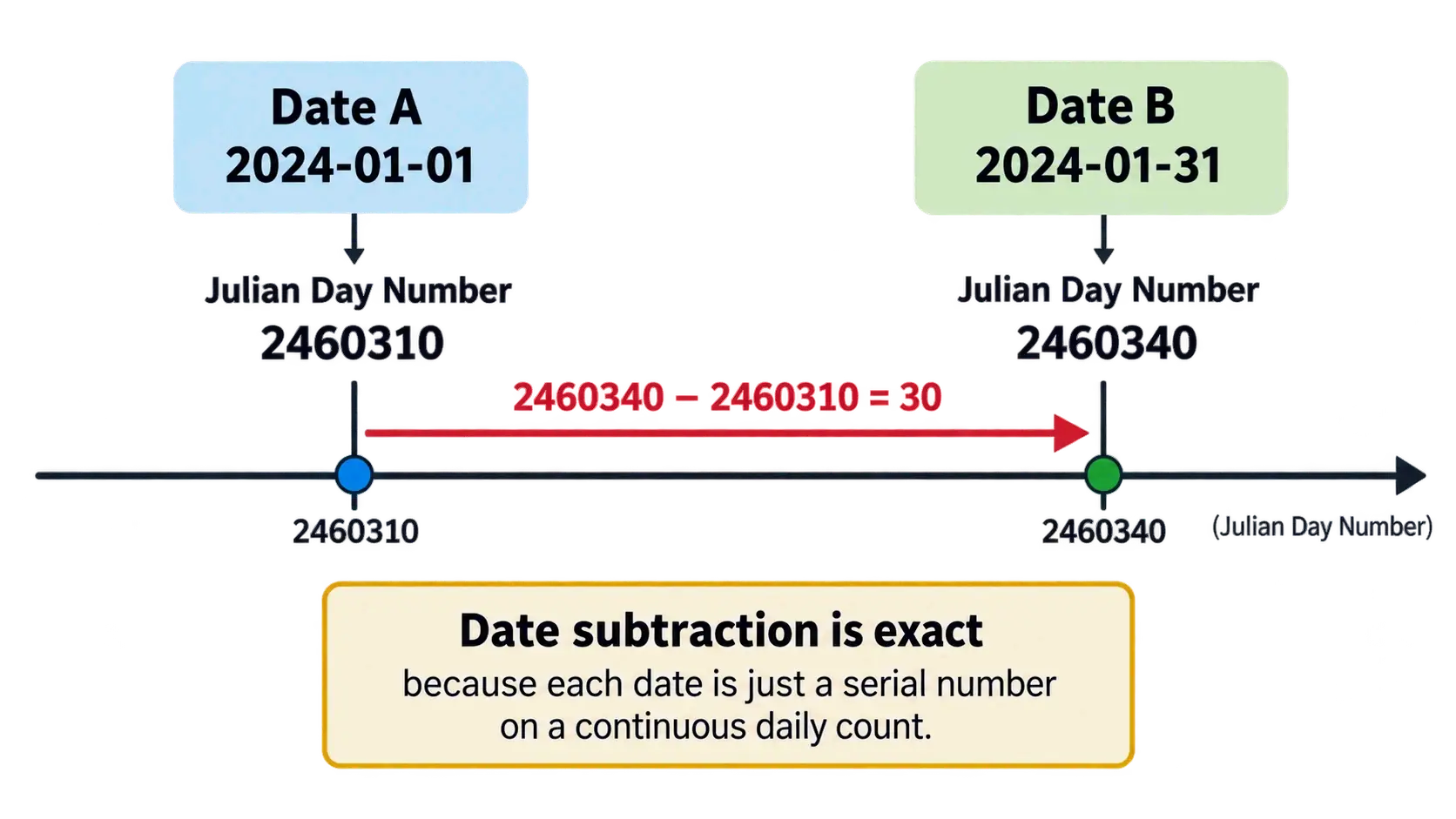
Every calendar date is a serial number (Julian Day Number)
Each date is first converted into one continuous count of days — a date serial, often implemented as a Julian Day Number, which counts days from January 1, 4713 BC (ourcalculators). Subtraction then compares two integers instead of two human-readable strings.
That conversion step absorbs the messy parts of the calendar: uneven month lengths, leap days, and historical calendar reforms. Once both dates exist as serial numbers, the difference is a subtraction any computer can perform exactly.
The Gregorian leap-year rule in one line
The rule is: a year divisible by 4 is a leap year, except century years, which are leap years only if they’re divisible by 400 (calculatorsconversion). So 2000 was a leap year, and 1900 was not.
The practical effect is always exactly one day, never a fraction. January 1, 2024 to January 1, 2025 spans 366 days because 2024 contains February 29. January 1, 2025 to January 1, 2026 spans 365 days (datecalculatorbetweentwodates.com). A shorter, more local example comes from the checked-example table at calculatorsconversion: February 28 to March 1, 2024 returns 2 days, not 1, because February 29 sits between them.
Should You Include the End Date? Inclusive vs Exclusive Counting
This one setting causes more disagreement between calculators than any other factor. Most tools offer the toggle without explaining when to flip it.
The default in most calculators is exclusive counting: the start date counts, but the end date does not. Read the same range inclusively, and you add one day. From the 1st to the 5th, that’s 4 days excluded and 5 days included (ROBERIN).
Decision table: which scenarios count the end date
| Exclude the end date | Include the end date |
|---|---|
| Age calculation | Hotel nights and rentals |
| Project or work duration | Leave and vacation days used |
| Standard mathematical date subtraction | Event and conference duration |
| Intervals expressed as nights | Assigned work or usage days |
The logic behind the split is whether the final day is experienced or merely marked. A hotel stay booked from Monday to Friday is four nights, because you sleep four times. The same trip described as vacation days used is five, because Friday is still a day away from work.
Why June 1 to June 1 is not a full year
Exclusive counting has a boundary that surprises people. According to DQYDJ’s month calculator documentation, June 1, 2000 to June 1, 2001 shows less than twelve months, because the calculator counts the first date but not the ending date. Extend the end to June 2, 2001, and you get exactly 12 months.
The fix is simple: if a result looks one short, move the end date forward by one day instead of assuming the tool is broken.
Calendar Days vs Business Days: Weekends and US Federal Holidays
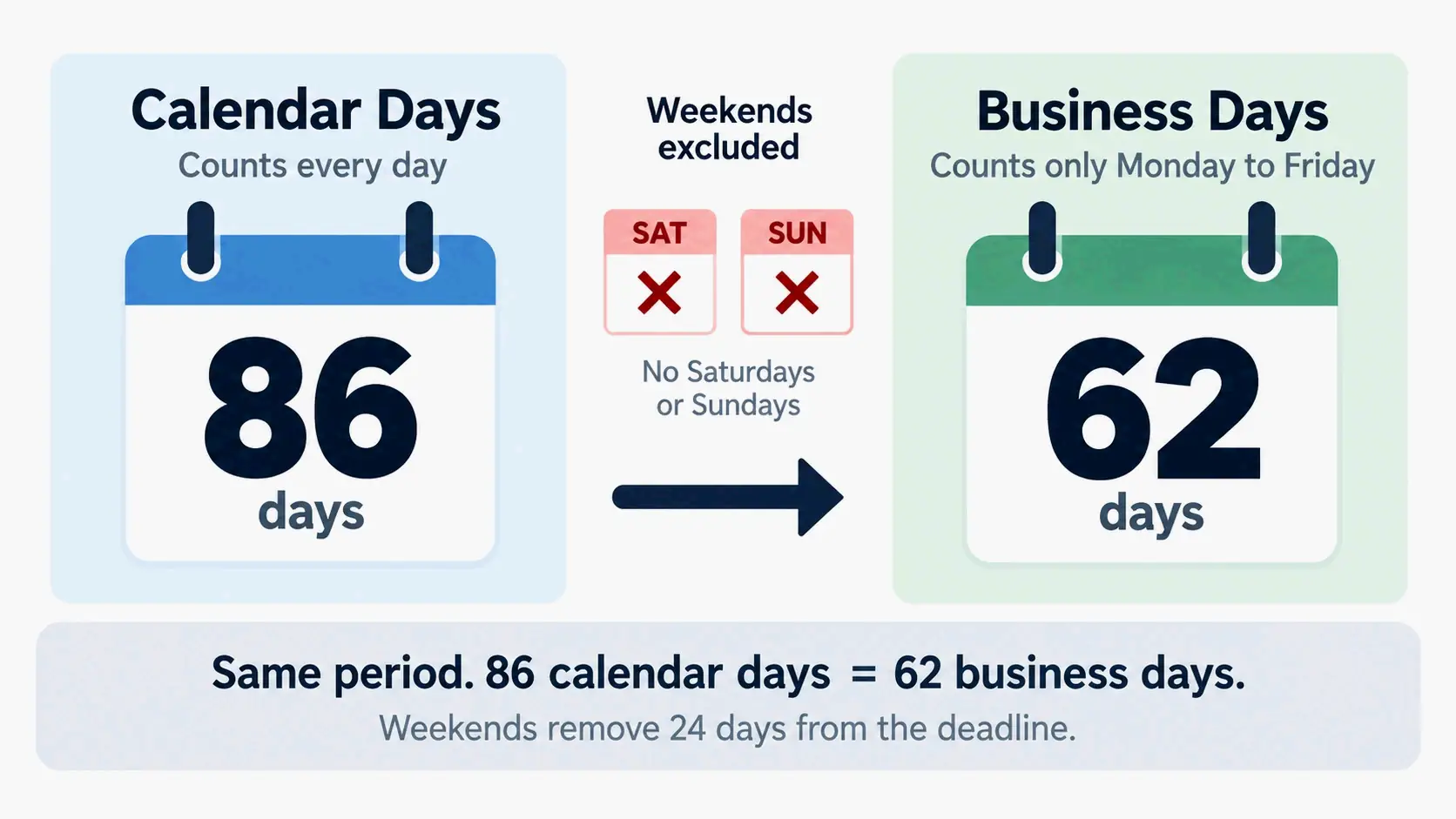
Calendar days count every date in the range, including Saturdays, Sundays, and holidays. Business days count only working days. Over a long span, the two numbers can diverge enough to move a deadline by nearly six weeks.
What counts as a business day in the US (FRCP Rule 6)
In US legal usage, the Federal Rules of Civil Procedure Rule 6 defines a business day as any day that is not a Saturday, a Sunday, or a federal legal holiday (ourcalculators). That definition, not the informal “Monday through Friday,” is what governs court filing deadlines.
The size of the difference is easy to underestimate. Between July 6 and September 30, 2026 there are 86 calendar days but only 62 business days once weekends are excluded — roughly a 28% reduction (ourcalculators). A “90-day” contract term and a “90-business-day” term therefore land close to six weeks apart.
11 federal holidays, observed dates, and why calculators don’t subtract them
At the federal level, the United States observes 11 holidays, with Juneteenth added in 2021. A standard year contains 260–262 working days before holidays, and roughly 249 working days per year after federal holidays are removed (ourcalculators).
Holiday handling is where tools are least reliable, and it’s worth being direct about that. Most business-day calculators exclude Saturdays and Sundays only, because holiday calendars vary by country, region, and organization (calculatorsconversion). Even tools that support holiday skipping may cover a limited range — ROBERIN’s holiday dataset covers US federal holidays for 2024 through 2027 with observed weekend shifts, and treats dates outside that window as ordinary weekdays.
Two more caveats apply. The US Office of Personnel Management publishes the official federal holiday schedule including observed dates, which shift a Saturday holiday to the preceding Friday and a Sunday holiday to the following Monday. Bank or stock-market calendars can also differ from the federal list, so a business-day count that matters should be checked against the specific calendar that governs it.
The honest summary: weekend exclusion is reliable, holiday exclusion is approximate, and any formal deadline should be verified against the applicable rule and holiday source rather than a calculator’s output alone (calculator disclaimer at calculatorsconversion).
Result Off by One Day? A 60-Second Troubleshooting Checklist
Two calculators returning results one day apart is almost always a settings mismatch, not an arithmetic error. Run these four checks in order.
Four checks, in order
- Include end date. This is the cause in roughly nine out of ten cases. September 1 to September 15, 2026 is 14 days exclusive and 15 days inclusive. Flip the toggle, and the two tools should agree.
- Weekend exclusion. If the other tool was in business-day mode, its number will be lower by the number of Saturdays and Sundays in the range.
- A crossing of February 29. If your interval contains a leap day, the count is one higher than a non-leap equivalent (datecalculatorbetweentwodates.com).
- Date format misreading. An input of 03/04 can be read as March 4 or April 3 depending on locale, which silently shifts the result by weeks.
A quick sanity check against the checked-example table at calculatorsconversion — each row short enough to verify by hand — settles most disputes in under a minute.
ISO 8601 (YYYY-MM-DD) as an input habit
The ambiguity in the fourth check disappears when dates are written in ISO 8601 format, which puts the year first: 2026-09-15. Software and official records use this standard precisely because it can’t be confused with a day-first or month-first reading (ISO 8601). When you enter a date whose month and day are both 12 or lower, typing it in this order removes the risk entirely.
Leap Years and End-of-Month Clamping: The Two Rules That Change Your Count
Two calendar behaviors account for nearly every “why is this number different from what I expected” question. Both are rules, not defects, and both behave consistently across Excel, Python, and web calculators.
February 29: when your count gains a day
A leap day adds exactly one day to any interval that spans it, and only those intervals. A leap year contains 366 days instead of 365, which is why the full-year comparison reads 366 versus 365 (datecalculatorbetweentwodates.com).
For short ranges, the effect is easy to spot: February 28 to March 1 returns 1 day in an ordinary year and 2 days in 2024, because the leap day sits inside the range (calculatorsconversion).
January 31 + 1 month = February 28 or 29?
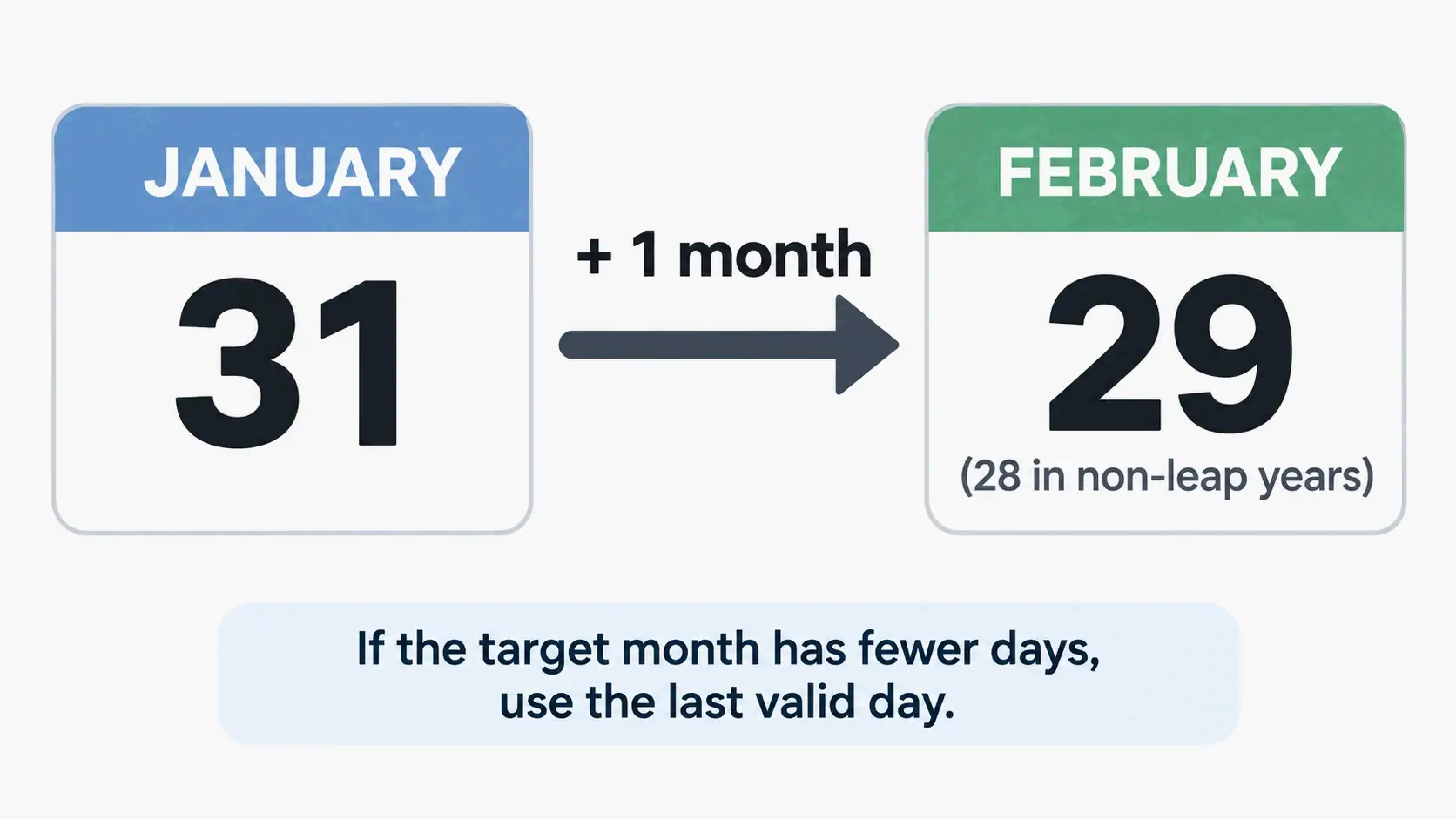
Adding months or years to a date triggers end-of-month clamping. When the target month has no matching day number, the result falls back to that month’s final valid day instead of spilling into the next month.
The two classic cases: January 31, 2024 + 1 month = February 29, 2024, and February 29, 2024 + 1 year = February 28, 2025 (calculatorsconversion). The same operation on January 31, 2025 lands on February 28, because 2025 has no leap day.
“Does not overflow” and “silently changes the day number” describe the same behavior. It matters for monthly billing dates and recurring schedules, where a clamp can shift a recurring date by a day or two across February (ourcalculators).
Add or Subtract Days, Weeks, and Months From a Date
The inverse question — what date falls 90 days from now, or 6 months before a deadline — uses the same calendar math run in the opposite direction. It’s the second mode on nearly every date calculator.
Adding days and weeks (straight arithmetic)
Days and weeks are pure arithmetic. Adding a week moves the date forward by exactly seven days, and adding a day moves it by exactly one, with no clamping and no exceptions. The calendar absorbs the carries automatically.
Common business intervals are worth noting: 30, 60, and 90 days are the usual contract and payment windows, and 2 weeks is the standard sprint or notice period. When the addition needs to land on a working day, tools that support it let you apply weekend and holiday skipping to the added duration rather than only to a difference calculation (ROBERIN).
Adding months and years (clamping applies)
Months and years behave differently because they aren’t fixed lengths. Adding one month to January 31 produces 2024-02-29 (a Thursday) — the leap-year clamp — rather than March 1 (ROBERIN). Tools generally apply years and months first, then weeks and days. Changing that order near a month-end can produce a different result (calculatorsconversion).
How to Calculate Days Between Dates in Excel and Google Sheets
Spreadsheets store dates as plain numbers. That’s exactly why simple subtraction works — and why the most common error is a formatting problem, not a formula problem.
Simple subtraction: =B2-A2 and the formatting trap
With a start date in A2 and an end date in B2, =B2-A2 returns the number of days. The trap is that Excel may carry the date format over to the result cell and display a date-looking value instead of a number. Format the result as a number to fix it (timeanddatecalculator.com). This works the same way in Google Sheets, which uses the same date serial system.
DATEDIF for years, months, and days (plus its edge-case flaw)
DATEDIF produces the years-months-days breakdown using three unit codes. The standard construction concatenates the parts:
=DATEDIF(B5,C5,"y")&" years, "&DATEDIF(B5,C5,"ym")&" months, " &DATEDIF(B5,C5,"md")&" days"
That formula, documented by Dave Bruns at Exceljet, returns a string such as “1 years, 6 months, 0 days.” A LET-based version that defines start, end, years, months, and days as named variables is easier to read and can be extended to handle singular and plural unit names.
One caveat is worth carrying forward: according to Exceljet, DATEDIF can return incorrect results with date pairs that touch specific edge cases. The recommended workaround is to build an alternative with a custom LAMBDA function. For straightforward intervals, the function is fine. For production formulas serving a whole workbook, test your specific date boundaries.
NETWORKDAYS / NETWORKDAYS.INTL for business days and holidays
For business-day counts, NETWORKDAYS excludes Saturdays and Sundays automatically and can also exclude a supplied list of holidays. NETWORKDAYS.INTL accepts custom weekend patterns for schedules that don’t follow a standard Saturday-Sunday week (timeanddatecalculator.com). This is the only method described here that removes holidays natively — the equivalent web calculator exclusions usually stop at weekends.
When a Day Count Isn’t Enough: Age, Time Zones, and Daylight Saving
Day counts answer calendar questions, not clock questions. The two diverge in a few situations worth knowing before you rely on a number.
Days are calendar days, not 24-hour blocks
A calendar-day difference is not an hours-between-times calculation (calculatorsconversion). Calendar dates carry no time zone or daylight-saving component, which is exactly why date subtraction gives a stable whole number while adding and subtracting clock times does not.
The reason is that daylight-saving transitions make a day 23 or 25 hours long instead of 24 (timeanddatecalculator.com). An hours-and-minutes total spanning the transition can be off by an hour; a plain day count is unaffected. Similarly, a period calculation across time zones, or one that crosses midnight, may need an extra day added outside the date difference itself — a job for a timezone converter rather than a date calculator.
The distinction between calendar and clock measurement is a formal one in metrology, which is why the National Institute of Standards and Technology is the reference used for time and frequency standards.
Turning a day count into an age
An age calculator is the same date-difference logic with a different output format. Enter a birth date and a reference date, and the tool returns years, months, and days rather than a raw total (MiniToolsPro) — the full walkthrough for how to find your exact age applies the same exclusive-end convention.
For age specifically, the end date is excluded. That matches standard convention and matters when eligibility hinges on a cutoff date — the age calculator approach is more precise than counting whole years when a single day can decide the outcome (ourcalculators).
Conclusion
The answer to how many days between two dates always depends on two variables: the dates themselves, and the counting rule you apply to them. The subtraction is never in doubt. What changes the number is whether the end date counts and whether weekends are excluded.
Run the calculation, then check the two toggles against the troubleshooting list above before you use the result. If the number is going into a contract or a spreadsheet, restate it with DATEDIF or NETWORKDAYS and verify any holiday assumptions against the OPM federal holiday calendar. For any interval crossing February 29, add the extra day. When months or years are involved, confirm the end-of-month clamp landed where you intended.
FAQ
Why is my result off by one day compared with another calculator?
In most cases, the include end date setting differs: September 1 to September 15, 2026 is 14 days exclusive and 15 days inclusive. The next most common cause is counting mode — the other tool may have excluded weekends. Also check whether the range crosses February 29 and whether a date like 03/04 was read month-first or day-first.
Does the calculator count weekends and public holidays?
In the default calendar-day mode, weekends and holidays are both included in the total. Only business-day mode removes Saturdays and Sundays. Federal holidays are usually not subtracted automatically, and a tool’s holiday data may cover only certain years. For anything formal, verify against the OPM holiday calendar.
How does February 29 in a leap year change the count?
It adds exactly one day to any interval that spans it, and no more. January 1, 2024 to January 1, 2025 is 366 days, while January 1, 2025 to January 1, 2026 is 365 days. The Gregorian rule is divisibility by 4, with century years requiring divisibility by 400 — so 2000 was a leap year and 1900 was not.
What is January 31 plus one month?
It is the last day of the target month, not the first day of the next one — a rule called end-of-month clamping. January 31, 2024 plus one month is February 29, 2024; the same date in 2025 yields February 28. The rule extends to years: February 29, 2024 plus one year is February 28, 2025.
Can I use this number for a contract or court deadline?
First establish whether the rule specifies calendar days or business days, since the two can diverge by nearly six weeks over a long span. In US legal usage, Federal Rules of Civil Procedure Rule 6 defines a business day as any day that is not a Saturday, Sunday, or federal holiday. Treat calculator output as an estimate and confirm the deadline against the governing rule, the court’s holiday calendar, and professional advice.